Saturday, February 10, 2018

import a .csv file that uses UTF-8 character encoding


Today I need make a convert from csv to excel and found that some special characters have been destroyed in excel . so googled a way to resolve this issue.

It works for me :)
 
From https://www.itg.ias.edu/content/how-import-csv-file-uses-utf-8-character-encoding-0

How to import a .csv file that uses UTF-8 character encoding

Follow the steps outlined below to use Microsoft Excel 2007 to open a .csv file that uses UTF-8 character encoding.
  1. Open Microsoft Excel 2007.
  2. Click on the Data menu bar option.
  3. Click on the From Text icon.
  4. Navigate to the location of the file that you want to import.  Click on the filename and then click on the Import button.  The Text Import Wizard - Step 1 or 3 window will now appear on the screen.
  5. Choose the file type that best describes your data - Delimited or Fixed Width.
  6. Choose 65001: Unicode (UTF-8) from the drop-down list that appears next to File origin.
  7. Click on the Next button to display the Text Import Wizard - Step 2 or 3 window.
  8. Place a checkmark next to the delimiter that was used in the file you wish to import into Microsoft Excel 2007.  The Data preview window will show you how your data will appear based on the delimiter that you chose.
  9. Click on the Next button to display the Text Import Wizard - Step 3 of 3.
  10. Choose the appropriate data format for each column of data that you want to import.  You also have the option to not import one or more columns of data if you want.
  11. Click on the Finish button to finish importing your data into Microsoft Excel 2007.

Thursday, April 20, 2017

Forward : how to prevent your computer being tracked ?

Websites are pages of the web which are made containing information, audio and video files, images and much more. A website is hosted by a server and each computer has a name or an IP address through which you can find it to get the information that has been added to your web page in the computer network.
An IP address stands for Internet Protocol and it consists of numeric codes that are given to each computer that is participating in the computer network and communication. You should never confuse an IP address with the URL of a website. IP addresses are different for different websites.
These IP addresses can even be hacked and that is why you must try to make your IP as secure as possible in order to prevent it from getting tracked. There are many ways by which you can secure your IP address.

Using a Fixed IP Address


The very first thing that catches your eye when you search on how to secure your IP address is the consistency of your IP address. You must make sure that the IP address that you have come up with is not static. Although most gamers and others who travel a lot might prefer a static IP address, it must be kept in mind that once a hacker figures it out, he can attack again and again, trespassing on your virtual property.

 Link with DSL Account


Another factor to be considered involves your DSL account. Technically, an IP address is linked to your DSL account via a cable. This way the IP address does not change until the device is turned off. So you must try to power it off as often as possible every time you turn it on, there will be a different IP address visible and thus, harder to track than a constant one.

 Ensure a Unique User Agent


Every computer has a user agent and every time you log on to the internet, the browser gets to know about it and thus, someone can easily track it. However, if that user agent is unique, no one would be able to track it.

 Avoid Cookies!


Another thing that can secure your IP address is if you do not allow cookies in your computer, as cookies are something that can be used to track a computer. So for this purpose, you need to go to your browser settings and turn off the cookies option, or delete them once you are done browsing or surfing the internet.

 Download Protective Software today!


Another way to avoid getting your IP address tracked is to download software that provides protection against revealing your identity. This software helps you in securing your IP address. There is TOR, UltraSurf, MegaProxy along with other such software that are free of cost and can be used to ensure a safe browsing on the net. The windows Firewall must always be turned on and if you are using some other antivirus, make sure it’s firewall is turned on. Also, keep the software updated so that latest breaches can be tackled effectively.
Moreover, you must be very cautious and avoid clicking on random links from where you log on to a website. Instead of clicking on it, you can write it in the address bar and then browse, or you can just type it in the domain name of the website and get the results.
Cyber net is useful as well as dangerous at the same time. It is totally up to you to keep track of your security. So be on your toes at all times and employ the above-mentioned ways to keep hackers from accessing your PC.

https://www.brandignity.com/2012/06/5-smart-ways-to-keep-your-ip-addresses-from-being-tracked/

Wednesday, June 29, 2016

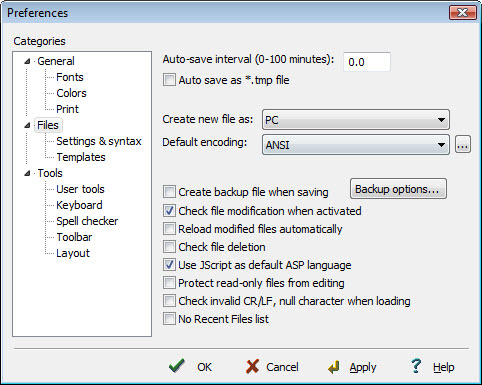
Editplus: How to disable the creation of the backup files (*.bak)

Copy from https://tecnoesis.wordpress.com/2009/08/20/disable-editplus-backup-bak-files/

o disable creation of the backup files (*.bak) while editing in EditPlus, follow this step:
  • Go to Tools -> Preferences -> ‘Files’ category and turn off  ‘Create backup file when saving’ option. You can also opt to save all the back up files in a chosen destination if you wish to, by clicking on ‘backup options’.

Monday, September 15, 2014

python environment setup-001 : pip and path configure


1  Starting from version Python 3.4, pip is already included in the regular install.

2 The Windows version is provided as an MSI package.

3 You can have multiple versions of Python on the same system without conflics.

4 only one interpreter can be the default application for Python file types.

5  It also does not automatically modify the PATH environment variable,
so that you always have control over which copy of Python is run.

my pc path :
E:\p27\;E:\p27\Lib\;

E:\devLW\Python32;

E:\devLW\Python32\Scripts;

3 download the get-pip.py

4 python get-pip.py

5 pip install virtualenv

6  virtualenv venv

e virtualenv kit provides the ability to create virtual Python environments that do not interfere with either each other, or the main Python installation. If you install virtualenv before you begin coding then you can get into the habit of using it to create completely clean Python environments for each project. This is particularly important for Web development, where each framework and application will have many dependencies.

To set up a new Python environment, change the working directory to wherever you want to store the environment, and run the virtualenv utility in your project’s directory


To use an environment, run the activate.bat batch file in the Scripts subdirectory of that environment. Your command prompt will change to show the active environment. Once you have finished working in the current virtual environment, run the deactivate.bat batch file to restore your settings to normal.

Each new environment automatically includes a copy of pip in the Scripts subdirectory, so that you can setup the third-party libraries and tools that you want to use in that environment. Put your own code within a subdirectory of the environment, however you wish. When you no longer need a particular environment, simply copy your code out of it, and then delete the main directory for the environment.

=============================
Reference list :

http://stackoverflow.com/questions/4750806/how-to-install-pip-on-windows

https://pip.pypa.io/en/latest/installing.html

http://docs.python-guide.org/en/latest/starting/install/win/


QTP VBS Excel SaveAs: how to save 2003 excel files (.xls) in the compatibility mode (2007 office Excel)


I have one qtp script and the come out result is default 2007 format .xlsx files and today I want to convert it to 2003 :


Just change the file name is xls and add number 56 or -4134 in the SaveAs codeline: see the below snippet:

          file_name=p_string&".xls"
            file_path="c:\1234\"
            new_file_location=file_path&file_name
            'obj_excel.ActiveWorkbook.SaveAs  new_file_location
           
            obj_excel.ActiveWorkbook.SaveAs  new_file_location,-4143
             

These are the main file formats in Excel 2007-2013, Note: In Excel for the Mac the values are +1

51 = xlOpenXMLWorkbook (without macro's in 2007-2013, xlsx)
52 = xlOpenXMLWorkbookMacroEnabled (with or without macro's in 2007-2013, xlsm)
50 = xlExcel12 (Excel Binary Workbook in 2007-2013 with or without macro's, xlsb)
56 = xlExcel8 (97-2003 format in Excel 2007-2013, xls)

Reference : 

http://stackoverflow.com/questions/17464698/open-an-excel-file-and-save-as-xls
http://www.rondebruin.nl/win/s5/win001.htm

Tuesday, September 2, 2014

09042014 Daily Enlgish video : Unit 4 I like your style


Unit 4
I like your style

just the shirt

where did you get it ?

I got it from the weekend market
How much did it cost ?
it cost about 12 dollars
do you like to wear jewelry ?
Do u have a pierced ear ?
Do u have a tattoo ?
yes, I do

//from the youtube video

https://www.youtube.com/watch?v=mSc5THUz4lw

Thursday, June 19, 2014

[VM-install]: "no boot files found "issue when you prepare to install the VM in the wmsphere client :

"no boot files found "issue when you prepare to install the VM in the wmsphere client :

You may encounter such issues when you intall one vm via wmshere client , pls check the belwo check points:

1 makes sure the avaible IOS format is loacted in the folder '/vmimages/..'
2 make sure set the virtual Device Node :IDE(0:0) CD/DVD Driver 1, it lets the boot program to boot form the CD/DVD